
We provide premium cPanel hosting!
  • Contact
  • View Cart (0)
  • Client Area
Your Company Logo
  • Domains
    Register Domain
    Your very own website address
    Transfer Domain
    Move your domain to Cen Cal Web Hosting

    Hundreds of customer's around the world trust Cen Cal Web Hosting to manage their domain. We provide freedom and control including full access & the ability to move/sell your domains.

  • Web Hosting
    Web Hosting
    Select Your Perfect Plan

    We provide a wide range of services for your business including Web Hosting, Dedicated Servers, VPNs & more.

  • Extras
    SSL Certificates
    Encrypt your website using https
    Website Builder
    An easy to create website builder tool
    Website Backup
    Protect your website with frequent backups
    Website Security
    Keep your website safe & secure
    Email Security
    Secure your incoming and outgoing email
    SEO Tools
    SEO report with optimization steps
    Professional Email
    Powerful email and productivity
    Site Builder
    Drag and drop DIY site builder
    XOVI NOW
    SEO optimization & reporting
    NordVPN
    Protect your online privacy
    360Monitoring
    Monitor your website

    Enhance your website with these extras including our website backup & security services.

  • Cen Cal Web Hosting
    Cen Cal Web Hosting
    Learn more about Cen Cal Web Hosting
    Why Choose Us
    The reasons why to choose us
    Testimonials
    Lots of feedback from our customer's
    Affiliate Program
    Make money with Cen Cal Web Hosting
    Announcements
    Get up to date with the latest news
    Downloads
    View our collection of downloads

    Learn more about what makes Cen Cal Web Hosting the best choice for web hosting services.

  • Addons
    WHMCS Templates
    The best web hosting templates
    WordPress Themes
    Feature-rich WordPress themes
    HTML Templates
    Responsive HTML5 Templates
    Blesta Templates
    Blesta web hosting templates
    Clientexec Templates
    Powerful templates for Clientexec
    WHMCS Modules
    Enhance your WHMCS system
    Scripts
    Menus, feature boxes & tables
    Logo Design
    Custom vector logo design service
    Banner Design
    Custom animated banner design
    WHMCS Services
    Setup, configuration & custom services
    WordPress Services
    Installation, integration & more
    Blesta Services
    Installation, integration & more
    Clientexec Services
    Installation, integration & more

    Launch your business with our range of website templates and related services.

  • Support
    Contact Form
    Contact our pre-sales department
    Submit Ticket
    Contact our support via ticket
    Knowledgebase
    View our vast documentation

    If you have a pre-sale question or issue with your website we are here to help.

  • Order

Knowledgebase

Portal Home > Knowledgebase > Plesk > CloudLinux (Plesk) > How to Increase or Decrease PHP Memory Limit via CloudLinux Selector in Plesk

  Categories

Backup/Restore
4
CloudLinux (cPanel)
10
cPanel - Control Panel
24
Databases
11
DirectAdmin
48
DNS - Nameservers
6
Domain Management
10
Email
17
FTP
9
Installing a Control Panel
6
Mail Filters & SPAM
8
Mobile
11
Others
3
PayPal
7
Plesk
47
Security
10
SiteWorx (Control Panel)
58
Softaculous
69
SolusVM
18
SSL
5
Virtualizor
19
WHM
18
WordPress
17

  Categories

  Support

My Support Tickets
Announcements
Knowledgebase
Downloads
Network Status
Open Ticket

How to Increase or Decrease PHP Memory Limit via CloudLinux Selector in Plesk Print

  • 0

You can modify PHP Memory Limit as per your needs using CloudLinux PHP Selector in Plesk.

1. Log in to your Plesk account.

2. In the right-hand sidebar, click on PHP Selector.

Plesk-CL-PHP-Selector-menu.gif

3. Click on the Options menu.

CL-options-menu.gif

Note: If the Options page shows an error related to the native PHP version, change it to a non-native version first.

4. Look for memory_limit and click on the drop-down option displayed in front of it. Then choose the appropriate limit as per your requirements.
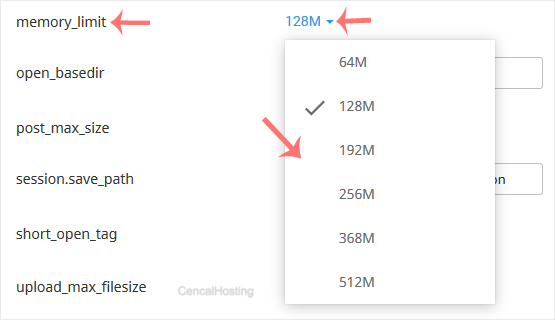

CL-increase-decrease-PHP-memory-limit.gif


Was this answer helpful?

Related Articles

How to Increase PHP's post_max_size Value Using CloudLinux's Selector in Plesk You can modify PHP post_max_size as per your needs using CloudLinux PHP Selector in Plesk.... How to Increase PHP's upload_max_filesize Value Using CloudLinux Selector in Plesk You can modify PHP's upload_max_filesize as per your needs using CloudLinux's PHP Selector in... How to Enable or Disable PHP's display_errors via CloudLinux Selector in Plesk Sometimes, we need to debug PHP. Hence, we need to enable display_errors or disable them for... How to Enable or Disable PHP Extensions Using the CloudLinux Selector in Plesk You can use CloudLinux Selector to enable or disable available PHP extensions in Plesk. 1.... How to Enable the Mailparse Extension of PHP Using CloudLinux Selector in Plesk You can use CloudLinux Selector to enable the Mailparse extension in PHP via Plesk. 1. Log...
« Back

  Support

My Support Tickets
Announcements
Knowledgebase
Downloads
Network Status
Open Ticket
Your Company Partners
728+ people trust Cen Cal Web Hosting
Join them today
Services
  • Web Hosting
Extras
  • SSL Certificates
  • Website Builder
  • Website Backup
  • Website Security
  • Email Security
  • SEO Tools
  • Professional Email
  • Site Builder
  • XOVI NOW
  • NordVPN
  • 360Monitoring
Domains
  • Register Domain
  • Transfer Domain
Addons
  • WHMCS Templates
  • WordPress Themes
  • HTML Templates
  • Blesta Templates
  • Clientexec Templates
  • WISECP Templates
  • HostBill Templates
  • WHMCS Modules
  • Scripts
  • Logo Design
  • Banner Design
  • WHMCS Services
  • WordPress Services
  • Blesta Services
  • Clientexec Services
Cen Cal Web Hosting
  • Cen Cal Web Hosting
  • Why Choose Us
  • Testimonials
  • Affiliate Program
  • Announcements
  • Downloads
Support
  • Contact Form
  • Submit Ticket
  • Knowledgebase
About Cen Cal Web Hosting
Cen Cal Web Hosting provides premium web hosting, domain registration & security services to businesses around the world.more
373 E. Shaw Ave. Suite 443
sales@cencalhosting.com
+1-559-478-7784
Cen Cal Web Hosting © 2026 | All rights reserved
  • WHMCS Templates
  • Terms Of Service
  • Acceptable Usage Policy
  • Privacy Policy
PayPal logo
Credit Card logo
RapidSSL logo

Loading...
Loading...

Generate Password

Please enter a number between 8 and 64 for the password length